Processing payment
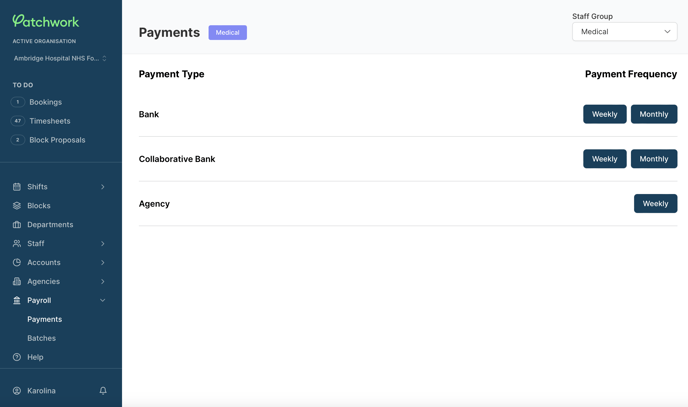
Select 'Payroll' in the Bank portal menu and then select 'Payments'
-
Select 'Weekly Payments/Monthly Payments' under the 'Collaborative Bank Payment Type' heading.
- You can change the Staff Group in the top right hand corner
-
View shifts that need to be submitted for payment
-
Select individual shifts by selecting the tick box beside each shift, alternatively, you can select all shifts by tapping the tick box on the top of the page.
-
Select 'Process Collaborative Weekly Payment Batch/Monthly Payment Batch.'
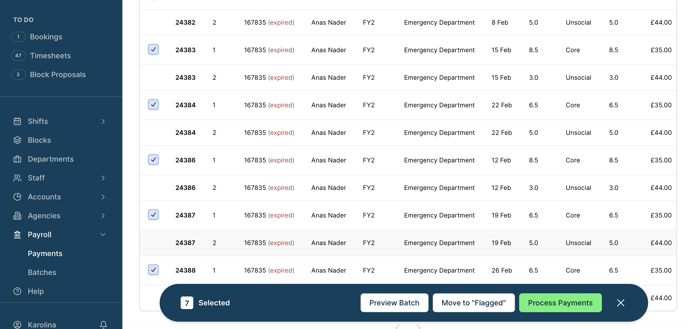
💡 Within the payments view, you also have the option to flag any shift for review. You can find further information about this here
This will create a payment batch, which can be exported and processed in the Trust's internal systems.
Accessing batches
-
Select 'Payroll' in the portal menu and then select 'Payments'
-
Select 'Weekly Batches/Monthly Batches' under the 'Collaborative Bank Payment Type' heading
-
Find the batch that has recently been submitted
-
Here you can view the batch by selecting the 'eye' icon or you can export the csv. file by tapping on the 'Download' button
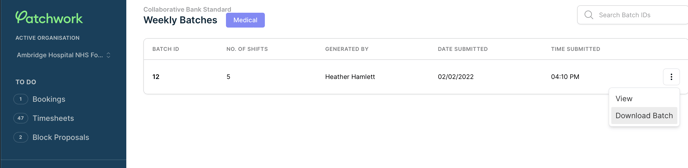
💡 You will need to specify which Staff Group you hope to process payments for in the top right hand corner of the payments page